

Employees
On this page
- Employee Register
- Adding Employees
- Training Register
- Adding Training Records
- Connecting Existing Employees
- Employee Compliance and Site Access
- Best Practice
EMPLOYEES
Maintaining accurate employee records is an important part of managing workplace compliance and meeting Work Health and Safety (WHS) obligations. Employee records help contractors demonstrate workforce competency, verify required training, and ensure workers are ready to work on site.
Onsite enables contractor administrators to register employees, manage training records, monitor workforce compliance, and prepare workers for project inductions and site access.
Keeping employee information up to date can also support capability statements, prequalification submissions, and builder compliance reviews.

Employee Register
The Employee Register contains the workers associated with your business.
Administrators can use the register to:
- Add new employees
- View employee details
- Maintain contact information
- Manage training and competency records
- Monitor worker compliance status
- Connect existing Certify Network users to the business
Registering employees before they arrive on site helps streamline inductions and reduces delays when workers first attend a project.
Adding Employees
The Add Employee function is used to register workers who will need access to Onsite and Certify Network.
When adding an employee, administrators should ensure that:
- The worker's name is entered correctly.
- A valid email address is provided.
- Required contact information is complete.
- Relevant training and competency records are uploaded where available.
Once registered, employees can access Onsite using their own login credentials and complete any required project inductions.
Tip: Contractors are encouraged to register workers and upload training records before workers arrive on site. This helps builders verify compliance requirements and allows workers to complete inductions more efficiently.
Training Register
The Training Register allows administrators to manage employee training and competency records.
Selecting an employee displays their current qualifications and training history, providing a central location for maintaining workforce compliance records.
Training records may include:
- Construction Induction (White Card)
- Trade and occupational licences
- High Risk Work Licences
- First Aid qualifications
- Plant and equipment competencies
- Industry-specific training and certifications
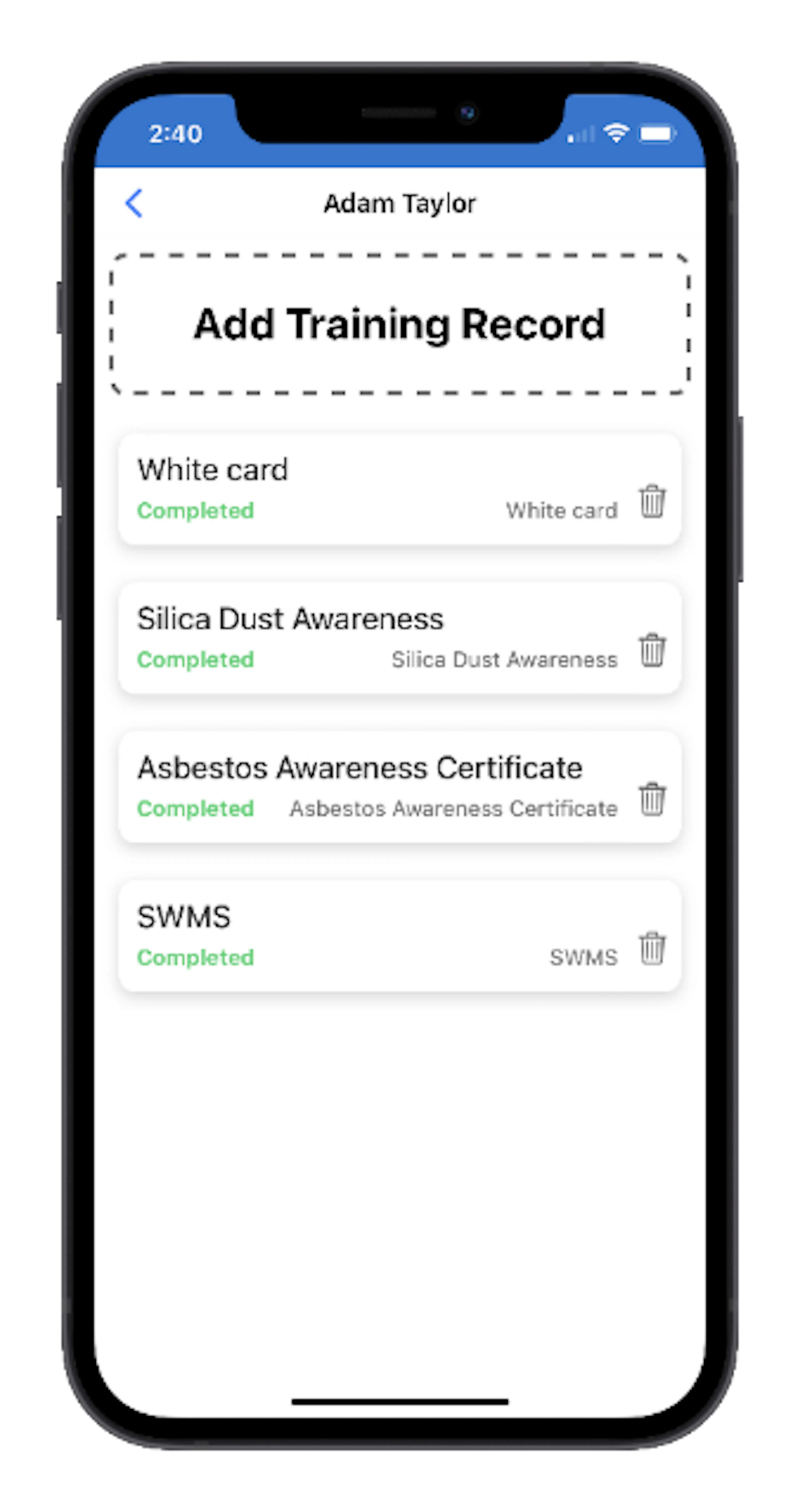
Maintaining current training records helps ensure workers are ready for project and site-specific requirements.
Adding Training Records
Training records can be added and updated from the employee's Training Register.
To add a new record:
- Open the employee record.
- Select Add Training Record.
- Enter the training details.
- Upload supporting documentation if required.
- Save the record.
Training records may also be viewed by workers within their personal Profile.
Because training records are stored in Certify Network, they can be reused across multiple builders and projects, reducing the need to repeatedly provide the same documentation.
Connecting Existing Employees
Some workers create their own Certify Network account before being added to their employer's workforce register. This commonly occurs when a worker first accesses Onsite by scanning a site QR code and completing the registration process independently.
These workers are not automatically linked to their employer until they complete an induction or are manually connected.
Administrators can use the Connect Employee function to associate an existing Certify Network user with their company.
To connect an employee:
- Select Connect Employee.
- Enter the worker's email address.
- Confirm the connection.
Once connected, the worker will appear in the company's Employee Register and their training records can be managed alongside other employees.
Employee Compliance and Site Access
Before a worker can commence work on a project, the following requirements will typically apply:
- The worker must be registered in Certify Network.
- The worker must be connected to the contractor engaged on the project.
- The contractor must have an approved SWMS where required.
- The worker must complete any required site or project inductions.
- Required training and competency records must be available when requested.
Administrators should regularly review employee records to ensure information remains accurate and compliance requirements are up to date.
Best Practice
To minimise delays and improve workforce readiness:
- Register employees before they attend site.
- Upload training and licence records as soon as they become available.
- Keep contact details current.
- Connect workers who have registered independently.
- Monitor induction and compliance requirements before workers are scheduled to start work.
Maintaining accurate employee records helps ensure workers can be inducted, sign in to site, and commence work without unnecessary delays.