
Utilities
The Utilities section helps contractors centralise operational activities, improve record keeping, and automate many of the administrative processes associated with construction compliance and workplace safety.
On this page
- Custom Functions
- Add Function
- Incident Alert
- Risk Assessments
- Export Records
- Principal Contractors
- Action List
- Best Practice
The Utilities section provides access to additional tools, resources, reports, and business processes that extend the functionality of Onsite and Certify Network.
Utilities can be used to integrate documents, forms, workflows, and external resources into the platform, helping contractors streamline administration, improve communication, and automate routine tasks.
Depending on your organisation's configuration, additional utility functions may be available.
Custom Functions
Onsite can be extended with custom functions that link to:
- Documents
- Web forms
- External websites
- Business applications
- Reporting tools
- Workflow processes
These functions can be tailored to meet specific business requirements and can be integrated with Microsoft Power Automate to automate tasks, notifications, approvals, and information collection.
This flexibility allows businesses to incorporate their own operational processes without requiring changes to the core application.
Add Function
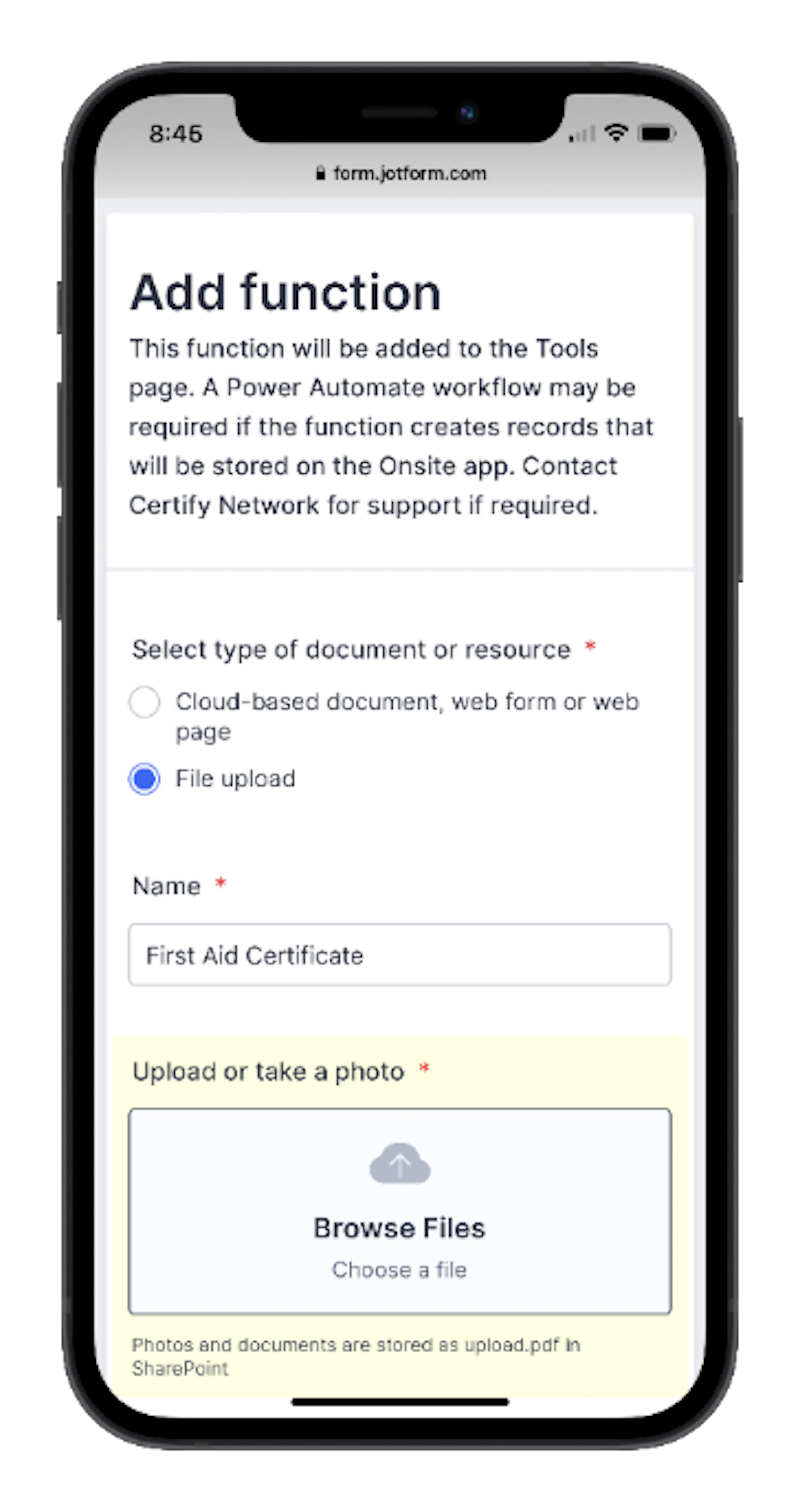
The Add Function feature is used to configure access to external resources from within Onsite.
Examples include:
- Company procedures
- Safety documentation
- Inspection forms
- Online registers
- Training resources
- Business systems
Where documents are uploaded, Onsite automatically stores them in Azure cloud storage and can combine related files into a single document for easier access and distribution.
Incident Alert
The Incident Alert function is used to notify relevant stakeholders when a workplace incident occurs.
Incident alerts can be raised for:
- Injuries
- Property damage
- Near misses
- Other safety-related incidents
The alert records information such as:
- Incident type
- Severity
- Location
- Actions taken
- Assistance required
- Additional comments
Notifications can be distributed by email and SMS, helping ensure that appropriate personnel are informed as quickly as possible.
Incident Alerts are intended for immediate communication and do not replace any formal incident investigation or reporting processes that may also be required.
Risk Assessments
The Risk Assessments function provides access to risk assessments completed by workers and supervisors.
Risk assessments are commonly used to:
- Identify workplace hazards
- Assess risks before work begins
- Document control measures
- Verify that work can be carried out safely
Depending on the organisation's requirements, custom risk assessment forms may be used for different work activities, trades, projects, or locations.
Completed assessments are stored electronically, providing a record of the risks identified and the controls implemented.
Export Records
The Export Records function allows data to be exported to Microsoft Excel for analysis, reporting, and record management.
Data that may be available for export includes:
- Contractor records
- Employee records
- Compliance records
- Register data
- Project records
- Inspection results
- Attendance records
Exporting records provides flexibility for organisations that wish to perform additional analysis or prepare management reports.
Principal Contractors
The Principal Contractors function displays the builders currently connected to the contractor's Certify Network account.
This provides a consolidated view of:
- Connected builders
- Active contractor relationships
- Builder-specific compliance requirements
- Project participation
Where compliance records are shared, approved documents can be reused across multiple connected builders, reducing administrative effort.
Action List
The Action List provides a summary of items that require attention.
It helps administrators and supervisors identify outstanding actions, overdue tasks, and compliance issues across the business.
The Action List may include:
- Corrective Action Requests
- Non-Compliance Notices
- Defect Notices
- Project activities
- Inspection items
- Register records
- Compliance requirements
- Contractor-related activities
Regularly reviewing the Action List helps ensure important tasks are completed promptly and compliance obligations remain current.
Best Practice
To get the most value from the Utilities section:
- Review the Action List regularly.
- Respond promptly to incident notifications and corrective actions.
- Use Risk Assessments before commencing work where required.
- Export records periodically for reporting and auditing purposes.
- Take advantage of workflow automation to reduce manual administration.
- Keep custom forms, documents, and resources current and accessible.